
BookingKoala scheduling is built for what the company homepage cheerfully calls “a boring service business” – house cleaning, dog walking, lawn care, barbering, tutoring and about twenty other trades where the whole business runs on who is going where, at what time, for how much. This review is about the engine underneath that: the booking form that takes the job, the BookingKoala scheduling layer that puts a person on it, and the three separate account types that keep the owner, the worker and the customer looking at the same calendar without phoning each other.

BookingKoala brand card (screenshot from bookingkoala.com)
Every figure below comes from BookingKoala scheduling documentation the company publishes itself. Plans start at 27 US dollars a month and you can start a free BookingKoala trial before paying anything, which makes this an unusually low-risk piece of software to evaluate properly.
How this review was done
This is a desk review. Nobody here signed up for an account, ran a booking through a form or dispatched a provider. Everything below was read on 26 October 2026 from BookingKoala own homepage, features page and pricing page, including the plan comparison matrix and the larger-plans calculator. Capability claims are reported as company claims. Where the published pages carry two different numbers for the same thing, both are quoted and neither is averaged, and the arithmetic in the pricing ladder is shown so you can check it yourself.
What the BookingKoala scheduling platform actually is
The company behind BookingKoala scheduling describes the product as “the all-in-one platform to run and grow a boring service business”, and the homepage opens by asking which trade you are in. The list it offers is long and specific: home cleaning, office cleaning, post construction, pet groomer, dog walker, carpet cleaning, car wash, window cleaning, pool cleaning, lawn care, moving service, barber, hair salon, photographer, spa, massage, esthetician, financial advisor, personal trainer, nail salon, lawyer, accountant, education and tutoring, gutter cleaning, chiropractor – and “Customize Your Own” for anything not on the list.
That matters more than it looks. Each trade is shipped as a pre-built BookingKoala scheduling configuration rather than a blank canvas, so the BookingKoala scheduling rules, the booking form fields and the pricing model arrive already shaped for the job. The company states that 20,000 or more people across industries, sizes and countries use the platform.

BookingKoala publishes eleven modules on its features page (screenshot from bookingkoala.com)
The features page breaks the product into eleven named modules: Booking Forms, Website Options and Themes, Hiring, Campaigns, Smart Scheduling, Marketing, Reports, Notifications, Provider Account, Customer Account and Merchant Account. The rest of this review follows the ones that carry the day-to-day work.
BookingKoala scheduling starts at the booking form
BookingKoala scheduling positions the booking form as a salesperson rather than a contact box. Its own bullets are blunt about the goal: “Satisfy customers that prefer to book online”, “Let the Form work for you even when you are sleeping”, and “Save time by having fewer calls to your office and use those savings elsewhere.”
Booking form capabilities as BookingKoala lists them (screenshot from bookingkoala.com)
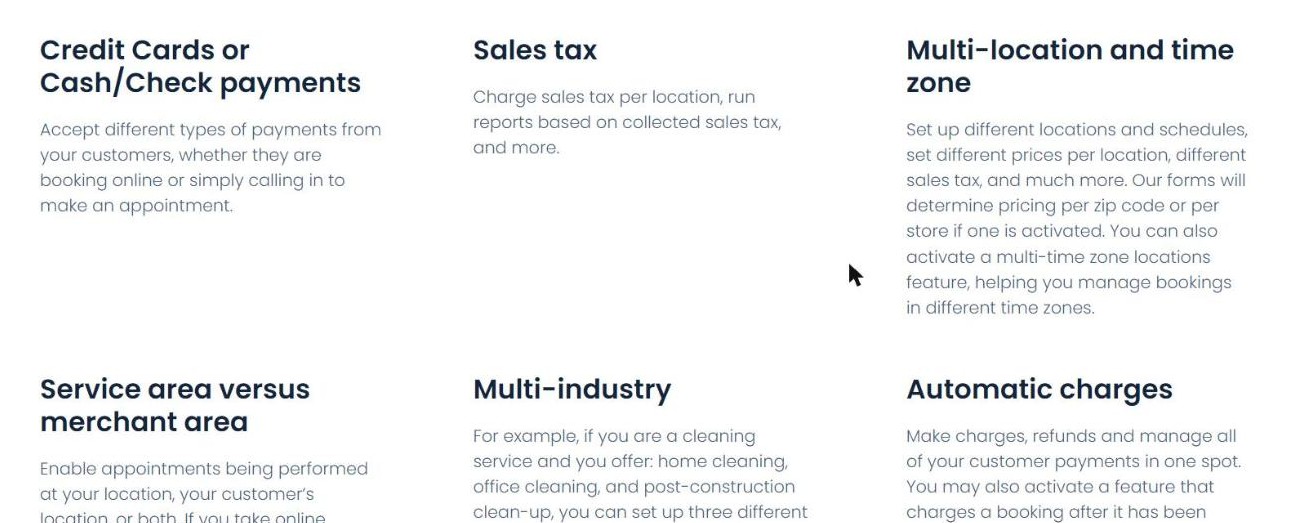
The configuration options published underneath are where the real work happens, and several of them are the kind of thing small operators normally bolt on with a second tool:
- Multi-industry – a cleaning company offering home cleaning, office cleaning and post-construction clean-up can run three separate industries with three different pricing points on one account.
- Multi-location and time zone – different prices per location, sales tax per location, pricing resolved per zip code, and a multi-time-zone mode.
- Automatic charges – charge, refund and manage payments in one place, with an option to charge a booking only after it has been completed.
- Expedited charges – an extra fee for same-day appointments.
- Credit card or cash and check – the form does not force card-only.
- Service area versus merchant area – jobs performed at your place, the customer place, or both.
The form can be used with a BookingKoala scheduling theme or installed on a site you already have, and the company says it is “completely mobile-friendly and optimized”.
BookingKoala scheduling: teams, pairing and the NA tag
Smart Scheduling is the heart of BookingKoala scheduling, and the module the company credits with making growth survivable: “As you grow, scheduling and rescheduling come up daily and finding spots should be easy and instant for you and your customers.”
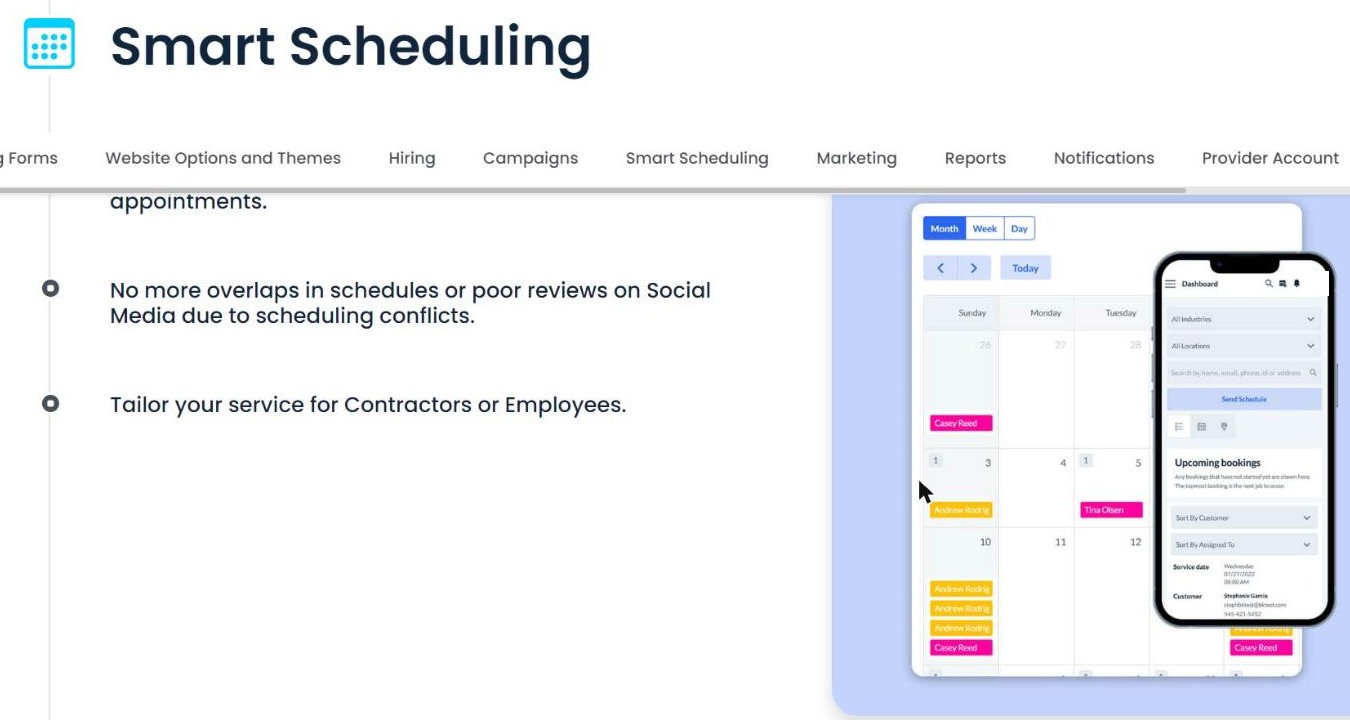
The BookingKoala scheduling calendar and dispatch view (screenshot from bookingkoala.com)
| Published capability | What it does |
|---|---|
| Individual, teams and pairing | Assign a single provider, build a team, or pair 2 or 3 people on one job |
| Not available scheduling | Book a provider outside their normal hours or area and tag the job NA |
| Unassigned job invites | Send invites for open jobs, or let qualified providers grab them themselves |
| Same-day bookings | Allow them and charge an expedited fee |
| Job views | Upcoming Jobs, Today Jobs and Job History tabs in one place |
| Rolling calendar | A new month is created once one completes, so three months of appointments always exist |
Two of those are worth lingering on. Pairing two or three providers on one booking is the thing most lightweight calendars cannot do, and it is exactly what a cleaning or moving crew needs. And the NA tag is an honest piece of design: instead of pretending every assignment is normal, the system marks the jobs where somebody agreed to work hours or an area they usually do not, so the owner can see at a glance how much goodwill the week is running on. BookingKoala scheduling also claims the result is “No more overlaps in schedules or poor reviews on Social Media due to scheduling conflicts”, and notes the system can be tailored for contractors or employees.
BookingKoala scheduling: three account types, one calendar
The architectural decision that shapes everything else is that BookingKoala scheduling ships three different front doors instead of one admin panel.
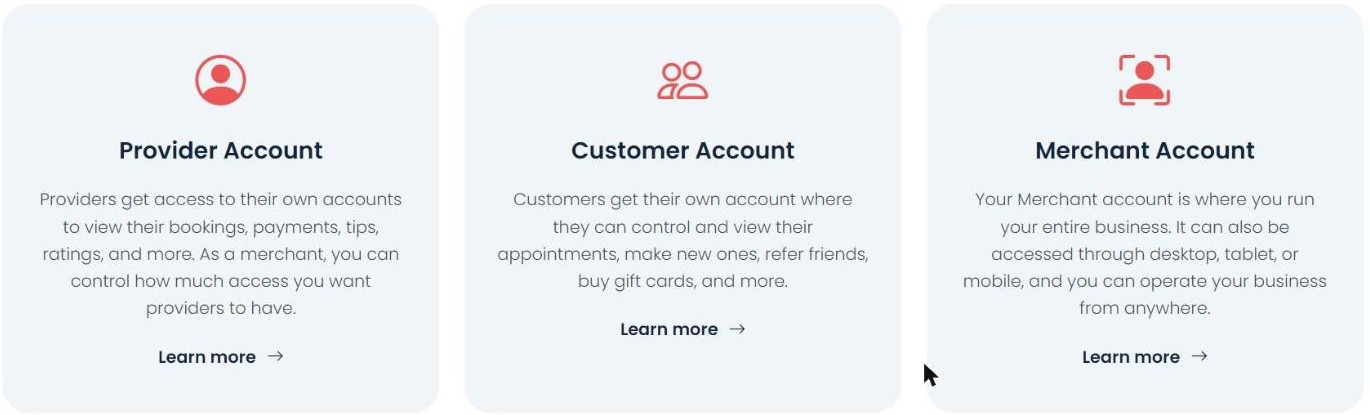
BookingKoala publishes three separate account types (screenshot from bookingkoala.com)
| Account | Who holds it | What BookingKoala says it does |
|---|---|---|
| Provider Account | The person doing the job | View bookings, payments, tips and ratings; the merchant controls how much access providers have |
| Customer Account | The client | Control and view appointments, make new ones, refer friends, buy gift cards |
| Merchant Account | The owner | Run the whole business from desktop, tablet or mobile, from anywhere |
All three BookingKoala scheduling accounts are accessible from any device and browser, and the company states that provider accounts update “in real-time, so if a customer cancels, that booking will instantly be removed”. A mobile app is included for providers. The practical payoff of this split is that the two questions that generate most phone calls in a service business – “when are you coming?” and “did I get paid for Tuesday?” – both have a self-service answer, which is the whole reason the BookingKoala scheduling layer exists.
Hiring: an applicant pipeline inside BookingKoala scheduling
Most scheduling tools stop at the people you already employ. BookingKoala scheduling ships a hiring module that runs the funnel from applicant to provider without leaving the platform: prospects move through stages you define, interviews are scheduled inside the module, contracts are built and sent in it, and – the detail worth noting – each contract is “IP stamped and tracked to identify who signed the contract”.
Quizzes are built in and “automatically graded instantly after submission”, reports track how many prospects came in, were rejected or were onboarded, and a nurturing link into the Campaigns module sends content to new prospects automatically. When somebody passes, the company says you “can quickly turn them into a Provider or Staff” – at which point they appear in the BookingKoala scheduling calendar. The module is included from the Growing plan upward, which you can check on the BookingKoala plan signup page.
BookingKoala scheduling alerts, campaigns and the rules that follow
BookingKoala scheduling bundles a full messaging layer rather than asking you to wire up a separate email tool. Campaigns send “automated or manual emails or texts” to contacts collected in the system based on actions they performed, aimed at recovering abandoned carts and converting leads. Notifications cover email, SMS and in-app alerts for owners, customers, providers and staff, each customisable, plus system alerts, delivery and open and click tracking, and “a powerful logging system that tracks all actions done by all users in the system”.
That is genuinely useful, and bolting campaigns onto BookingKoala scheduling also makes you a sender. Automated commercial email in the United States sits under the CAN-SPAM Act, and the FTC compliance guide for business sets out the obligations that follow – accurate header and subject lines, a visible physical postal address, a working opt-out honoured promptly, and responsibility that cannot be contracted away to the platform. SMS marketing carries its own consent rules. None of that is a knock on BookingKoala scheduling; it is simply the part of the job the software hands you along with the send button, and the system log is the thing that will tell you who pressed it.
Marketing and reporting around the BookingKoala scheduling core
The BookingKoala scheduling marketing module is built around getting repeat work out of a calendar you already have. Coupons come with restrictions you set. Daily discounts push customers toward slow days, which is a smarter lever than a blanket price cut because it fills gaps rather than discounting the jobs you would have sold anyway. A referral programme and a review system that can route customers to Yelp and Google round it out.
BookingKoala scheduling reporting covers company revenue, total bookings, ratings, why customers cancel, and which services are booked most. Leads collected from forms can be browsed and converted later. The lead-to-booking funnel, the hiring funnel and the campaign engine all read from the same contact records, which is the practical argument for an all-in-one over three separate subscriptions.
What BookingKoala scheduling costs
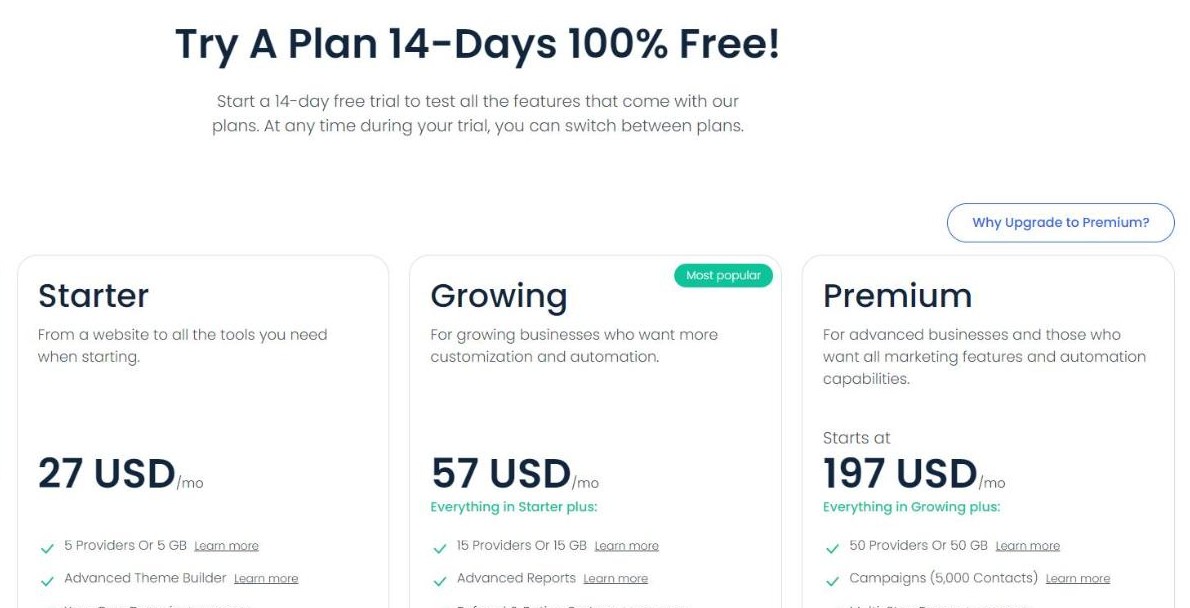
Three published BookingKoala scheduling plans, all billed monthly in US dollars:
The three published plans and the trial banner (screenshot from bookingkoala.com)
| Plan | Monthly price | Capacity | Notable inclusions |
|---|---|---|---|
| Starter | 27 USD | 5 providers or 5 GB | Advanced theme builder, your own domain, 1 custom lead form, blog, SEO |
| Growing | 57 USD | 15 providers or 15 GB | Everything in Starter plus advanced reports, referral and rating system, unlimited hiring prospects |
| Premium | From 197 USD | 50 providers or 50 GB | Everything in Growing plus Campaigns (5,000 contacts), unlimited lead forms, multi-step forms, onboarding |
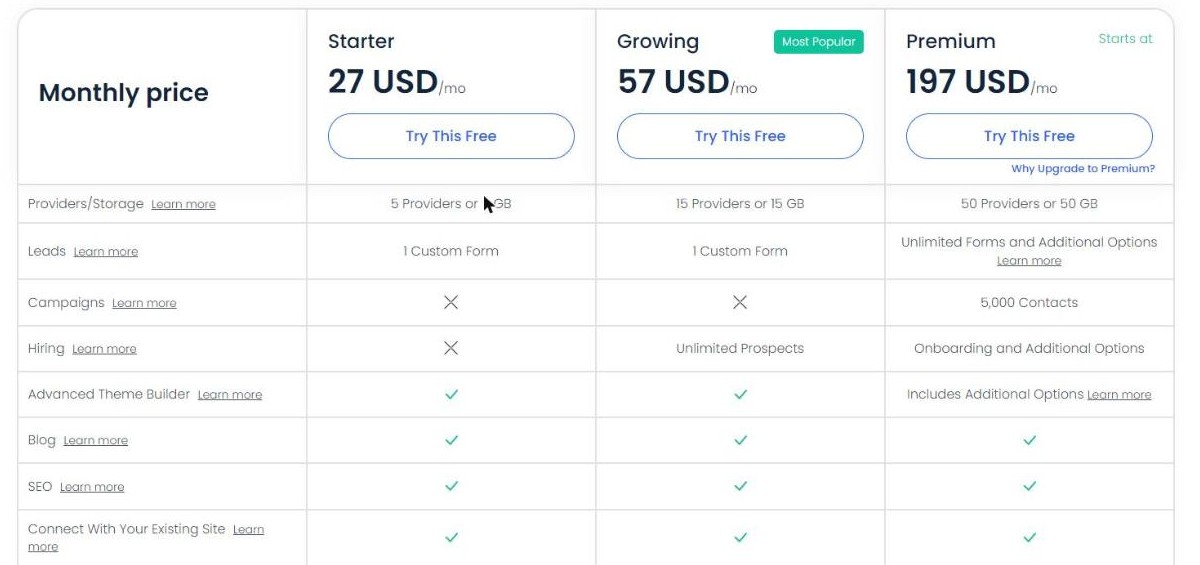
The published plan comparison matrix (screenshot from bookingkoala.com)
Read the comparison matrix rather than the headline prices and the shape of the product becomes clear. Campaigns is marked with a cross on both Starter and Growing and only appears on Premium, capped at 5,000 contacts. Hiring is a cross on Starter, unlimited prospects on Growing. The theme builder, blog, SEO and the ability to connect to an existing site are ticked on all three. In other words the BookingKoala scheduling and website layer is available from 27 dollars; the automated marketing layer is a 197-dollar feature.
The billing unit is “providers OR storage” – and the company says so plainly
Every plan row reads “5 Providers or 5 GB”, “15 Providers or 15 GB”, “50 Providers or 50 GB”. The or is doing real work, and BookingKoala scheduling documentation explains it without being asked:
“A service provider is someone that performs the service, which can be a maid, a dog walker, a barber, tutors. If you have teams, each team member is counted as a provider. Storage determines how much data you use each month. For example, if you don’t have any providers but you use BookingKoala to create thousands of blog posts, we will increase your pricing tier based on the data you’re using per month.”
Two BookingKoala scheduling consequences follow, and both are better known before you sign up than after. First, a five-person crew is five providers, not one account – team members count individually. Second, a content-heavy operator with a tiny field team can be moved up a tier by storage alone. Vendors frequently bury this sort of thing in a terms page; here it sits in the tooltip next to the number, which is the right place for it.
The larger-plans ladder is a straight line you can check
Above Premium, BookingKoala scheduling stops publishing named tiers and gives you a slider instead, described as “Everything in Premium included” with “pricing increases based on the number of Providers, Storage, or Contacts your business has or needs”. The ladder it exposes runs:
237 – 277 – 317 – 357 – 397 – 437 – 477 – 517 – 557 – 597 US dollars per month, with the first step starting at 60 providers or 60 GB and 10,000 contacts.
Ten BookingKoala scheduling steps, and the gap between every pair is exactly 40 dollars: 597 minus 237 is 360, and 360 divided by 9 intervals is 40. The step from Premium at 197 dollars for 50 providers to the first larger tier at 237 dollars for 60 providers is the same 40 dollars for the same 10 providers, which prices an extra seat at 4 dollars a month at that end of the range. A pricing page that stays arithmetically consistent across a slider is a small thing, but it means a buyer can model their own growth instead of booking a sales call to find out.
The BookingKoala scheduling free trial: two lengths on one page
The BookingKoala scheduling pricing page headline reads “Try A Plan 14-Days 100 pct Free!” and the paragraph under it says “Start a 14-day free trial to test all the features that come with our plans. At any time during your trial, you can switch between plans.” The BookingKoala scheduling homepage signup box agrees: “Try BookingKoala free for 14 days.”
Worth flagging for anyone shopping carefully: the pricing page source carries two trial lengths, not one. A span marked as the standard trial holds 14 and a second span marked as an extended trial holds 30; on a desktop layout the one that renders is 14. So the honest reading is that 14 days is what the page shows today, and that a 30-day variant exists in the same page. If a longer evaluation window matters to your decision, that is a one-line question for sales rather than an assumption – and either way you can open a BookingKoala trial and see which one your account gets.
Who BookingKoala scheduling fits
| This suits you if | Look elsewhere if |
|---|---|
| You run a trade on the published list and want it configured, not built | Your service does not resemble an appointment at all |
| You need crews, pairing and provider self-service, not a solo calendar | You are a single operator who only needs a booking link |
| You want the website and the booking form from the same vendor | You have a developer-built site you will not replace or embed into |
| 27 to 57 dollars a month is the budget and marketing automation can wait | You need campaign automation on day one at under 197 dollars |
| You can count your providers and your storage honestly before signing up | You want one flat price regardless of team size or data volume |
The short version
BookingKoala scheduling is a well-documented platform that tells you more than it has to. The booking form sells unattended, the BookingKoala scheduling handles crews and pairing rather than just slots, the three account types remove the two phone calls that eat a service owner day, and the hiring module is a genuine extra rather than a checkbox. The pricing page explains its own billing unit in plain English, keeps a perfectly linear ladder above Premium, and prices entry at 27 dollars a month.
The things to settle before you commit are all knowable in advance: campaign automation starts at the 197-dollar tier, every team member counts as a provider, storage alone can move your tier, and the trial length the page shows is 14 days while a 30-day variant sits in the same page source. Overall: 8.5 out of 10. Current plans, caps and trial terms are on the official BookingKoala signup page.
This article contains affiliate links. If you sign up through them the price you pay does not change. All figures were read from the vendor own published pages on 26 October 2026 and may change without notice.