

Before any reporting tool is worth evaluating on features, one question decides whether it is usable at all: will it connect to the systems your entities already run on? This review covers the Joiin integrations in detail – every ledger on the list, the three routes in that are not ledgers at all, and the point where what the connector pages promise and what the pricing table permits are not the same thing.
How this review was done. Everything below was read on 23 October 2026 from the public Joiin website: the integrations menu, each connector page, the Excel add-in page, the Zapier page, the spreadsheet import page and the Joiin Connect page, cross-checked against the plan comparison table on the pricing page. No account was created and no trial was started. This is a desk review of what the company publishes, and each claim is attributed to the page it came from. The live site is here if you want to check anything as you read.
The full map of Joiin integrations
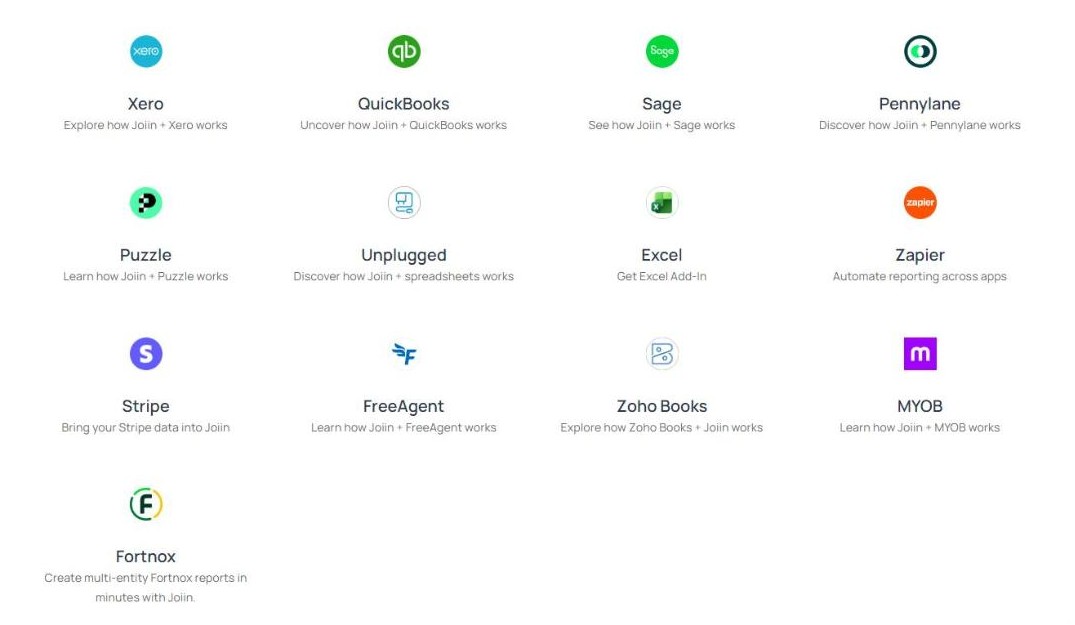
The Joiin integrations menu shows thirteen tiles. That number is accurate but it flatters the list slightly, because four of the thirteen are not accounting systems. Separating them is the single most useful thing a buyer can do before signing up.
| Group | What is listed |
| Accounting ledgers (10) | Xero, QuickBooks Online, Intuit Enterprise Suite, Sage, MYOB, FreeAgent, Puzzle, Pennylane, Zoho Books, Fortnox |
| Data routes (4) | Excel Add-in, Zapier, Stripe, Unplugged (spreadsheet import) |
So the honest count of ledger connections among the Joiin integrations is ten, with four extra ways to move data in or out. One inconsistency worth noting while you plan: Intuit Enterprise Suite appears in the accounting list on the pricing page but has no tile of its own in the menu.
Xero: the most complete of the Joiin integrations

Xero gets the deepest treatment of all the Joiin integrations. The page offers a Sign in with Xero button alongside the trial link, so the account can be created through Xero rather than set up separately, and the connection is described as taking minutes.
The company states it is a 5-star rated Xero Connected App shown in Xero’s Global “Featured App” collection, and the page carries a Xero Global App Awards 2026 Finalist badge. Those are company statements and a third-party badge rather than anything this review verified independently, and they are reported as such.
Functionally the Xero route covers the whole Joiin integrations feature set: group consolidation across multiple Xero entities, intercompany eliminations, multi-currency options and custom report layouts.
QuickBooks Online and Intuit in the Joiin integrations
QuickBooks Online is the second first-class citizen among the Joiin integrations. Its page offers Sign in with Intuit, the same single-sign-on shortcut Xero gets, and describes itself as a 5-star QuickBooks reporting app.
The pricing page also lists Intuit Enterprise Suite separately from QuickBooks Online in its accounting integrations line, which suggests the larger Intuit product is handled as its own connection. Since no dedicated page exists for it, anyone running Enterprise Suite should confirm the detail with support rather than assume parity with QuickBooks Online.
Sage: same features in the Joiin integrations, different front door

Sage is described in the same terms as the other two big Joiin integrations – connect in minutes, consolidate multiple Sage companies, produce group reports – and Sage appears throughout the intercompany documentation as a first-class source alongside Xero and QuickBooks.
The difference is in how you start. The Sage page offers only the 14-day trial button; there is no “Sign in with Sage” equivalent to the Xero and Intuit buttons. The trust badges on that same page are for the QuickBooks Marketplace and the Xero Marketplace, not a Sage marketplace.
This is a presentational and onboarding difference rather than a functional gap, and it is visible in thirty seconds by opening the three connector pages side by side. Worth knowing if your group is Sage-based and you expected the same one-click start.
The smaller ledger connectors in the Joiin integrations
Six further ledgers round out the Joiin integrations: MYOB, FreeAgent, Puzzle, Pennylane, Zoho Books and Fortnox. Each has its own page and each is positioned the same way – connect the entities, consolidate, report.
The pattern across the Joiin integrations catalogue is geographic as much as technical. MYOB covers Australia and New Zealand, Fortnox is a Swedish mainstay, Pennylane is French, and FreeAgent is a UK small-business staple. For a group with entities in several countries on several national ledgers, that spread is the practical argument for this product over a single-market tool.
What the pages do not publish is any per-connector feature matrix. Whether every ledger supports exactly the same fields is not stated anywhere this review could find, so a group relying on one of the smaller six should confirm that point before committing.
How the Joiin integrations actually connect
The mechanics are worth a paragraph because they explain both the speed and the limits. Each ledger connection is an authorised app link rather than a file transfer: you grant access, Joiin reads the chart of accounts and the transactions, and the entity appears in the consolidation. The company describes the setup as taking minutes, and the Xero and Intuit routes shorten it further by letting you create the Joiin account through the ledger itself.
What travels is more than the trial balance. The published description of the Joiin integrations covers financial data, sales and purchasing data, KPI figures and, through Stripe, non-financial data, which is what allows a board pack to carry revenue per headcount rather than only the statutory statements.
Security sits around that: the company states it runs on Amazon Web Services, offers two-factor authentication, and that deleting a company from Joiin fully deletes the data together with the access tokens held with the QuickBooks, Sage or Xero APIs. For a connector-heavy product the token clean-up is the part worth reading twice, because stale authorisations are how these setups go wrong months later.
No supported ledger? The spreadsheet route
This is the part of the Joiin integrations story the marketing pages bury and that matters most to anyone with an awkward system in the group.
The page for “Unplugged” says it plainly: “If you are not a Xero, QuickBooks or Sage user, you can still get all our consolidated reporting features by integrating spreadsheet data from any financial software like Sage 50 or QuickBooks Desktop.” You upload a CSV and the entity joins the consolidation like any other.
That is a genuine escape hatch. A group with four entities on Xero and one on a desktop system nobody integrates with is not blocked; it simply exports that one entity each month. The trade is obvious and the company does not pretend otherwise: the CSV route is manual, so it is a workaround rather than an automation. The spreadsheet import option is described on the site alongside the other connectors.
Excel among the Joiin integrations: live reports, not exports
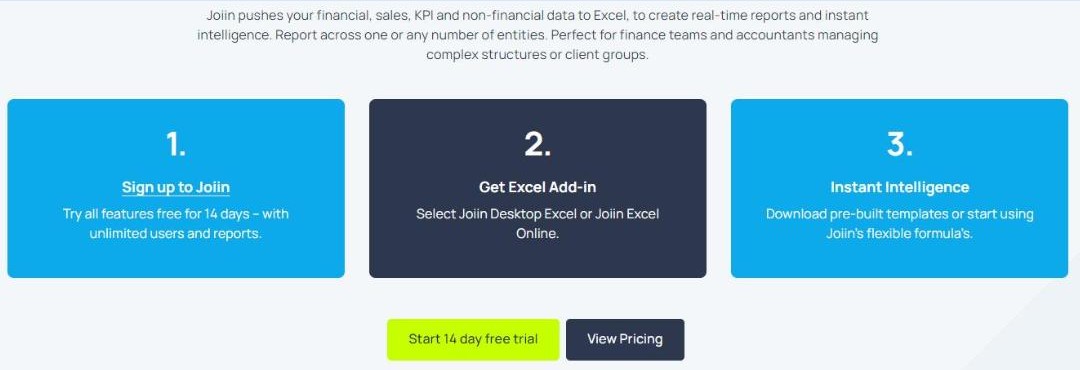
Every plan can export to PDF, CSV and Excel without using any of the paid Joiin integrations. The Excel Add-in is something different: it pulls live Joiin reports into a workbook, so the spreadsheet updates rather than being re-exported.
Two variants are published, Joiin Desktop Excel and Joiin Excel Online, and the setup is described in three steps: sign up, get the add-in, then use pre-built templates or Joiin formulas. The company says the add-in pushes financial, sales, KPI and non-financial data across any number of entities.
One thing the add-in page does not mention is that the plan table lists the Excel Add-in as unavailable on the entry plan. It starts at the middle tier.
Zapier, Stripe and Joiin Connect
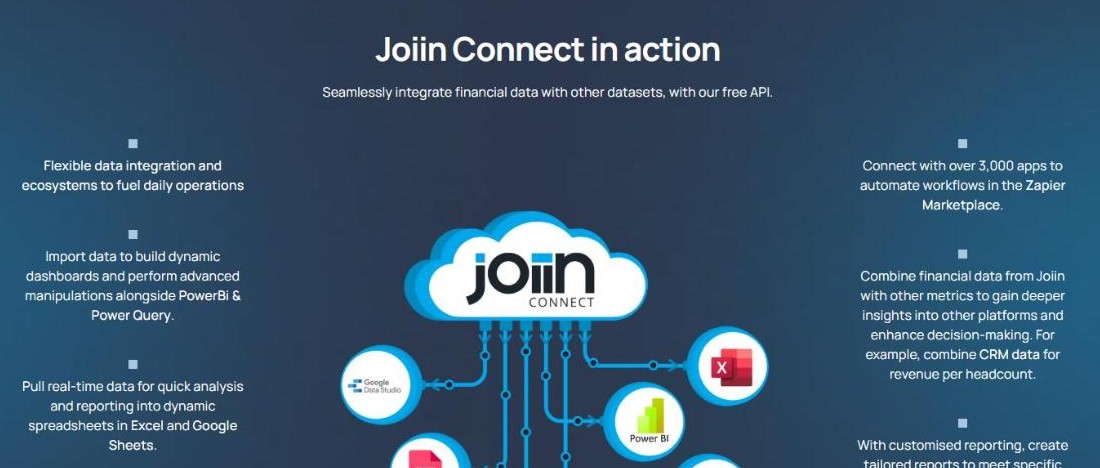
Three of the Joiin integrations make up the outbound side. Zapier connects Joiin to over 3,000 apps for no-code automation, by the company’s own figure. Stripe brings payment data in as non-financial data alongside the ledger figures. Joiin Connect is the API, positioned for pushing consolidated data into Power BI, Power Query, Google Data Studio, Google Sheets and warehouses.
That outbound capability is what separates a reporting tool from a reporting silo. If your group already reports through a BI layer, Joiin Connect is the piece that decides whether this product fits your stack at all.
Financial data moving between systems is exactly the problem that standards bodies exist to tame; the ISO 20022 organisation publishes the background on standardised financial messaging if you want the wider context behind why these connectors look the way they do.
The finding: “free API” in one place, top plan only in another
On one of the Joiin integrations, two company pages give different answers, and this review reports both rather than choosing between them.
The Joiin Connect page describes the capability under the heading “Joiin Connect in action” with the line: “Seamlessly integrate financial data with other datasets, with our free API.”
The plan comparison table on the pricing page lists the row “API and Zapier – accounting data in, data out to Power BI, Tableau and warehouses” as a dash on the entry plan, a dash on the middle plan, and a tick on the top plan only.
Both statements are published by the company on its own site. “Free” most plausibly means no separate API fee on top of the subscription rather than available to everyone, but the pages do not say so, and a reader of the Joiin Connect page alone would reasonably expect API access on any paid plan. It is one click between the two pages to check.
The second finding: the trial shows you the top plan
The Zapier page invites you to “sign up free for 14 days and explore every feature, with no limits”, and the Excel page says “try all features free for 14 days”. Both are accurate, and the reason the Joiin integrations all appear is on the pricing page: the top plan carries the badge “FREE TRIAL PLAN”.
So the trial runs on the most complete tier, then you choose where to land. The practical consequence for anyone evaluating Joiin integrations specifically: the Excel Add-in, the Zapier connection, the API and the MCP link to AI assistants are all live during the fortnight, and some of them stop being available if you then pick the entry plan.
This is not hidden and it is a reasonable way to run a trial. It does mean a buyer should decide which connections they actually need during the trial rather than after it, and price the tier accordingly. The plan table is at the foot of the pricing page.
Which Joiin integrations every plan gets
Set against the gated items, the base of the Joiin integrations is wide. The ten accounting connections are available on every plan, as is chart-of-accounts mapping with eliminations and export and sharing in PDF, CSV and Excel. Reports, report packs, users and multi-client access are all unlimited on every tier.
In other words, the connecting and consolidating is not the upsell. What costs more is moving the results somewhere else automatically – into a live workbook, into a Zap, into a warehouse, or into an AI assistant.
Who this suits, and who should check first
A strong fit for a group on mainstream cloud ledgers. Xero and QuickBooks get single-sign-on and the deepest documentation, and Sage is fully supported functionally.
A strong fit for multi-country groups. MYOB, Fortnox, Pennylane and FreeAgent cover national ledgers that single-market tools usually ignore.
Workable even with one awkward entity, through the CSV route, at the cost of a manual step each month.
Check the tier before committing if you need the outbound Joiin integrations. Excel Add-in from the middle plan, API and Zapier on the top plan only – decide during the trial, not after. Compare the connectors on the integrations menu against your own stack first.
Less suited if every entity sits on a ledger that is not on the list, because you would be importing spreadsheets for all of them and losing the automation that justifies the subscription.
The short version
Ten accounting ledgers in the Joiin integrations, a spreadsheet fallback for everything else, and four outbound routes including a documented API is a broader connector set than most tools in this bracket publish, and all ten ledger connections are available on every plan rather than being sold as an upgrade.
Two things to settle before you pay. The API is called free on its own page and listed as top-plan-only in the comparison table. And the generous trial runs on the top tier, so the connections you test are not necessarily the connections you keep.
Neither point is hidden, and neither undoes the value of the Joiin integrations. For a multi-entity group on supported ledgers, the Joiin integrations do the connecting part well, and the only real homework is matching the tier to the exits you need.
Overall: 8.5 / 10